Chat input
The chat input is a text field for composing and submitting messages in conversational interfaces. It supports both AI-assisted interactions and human-to-human chat.
Usage
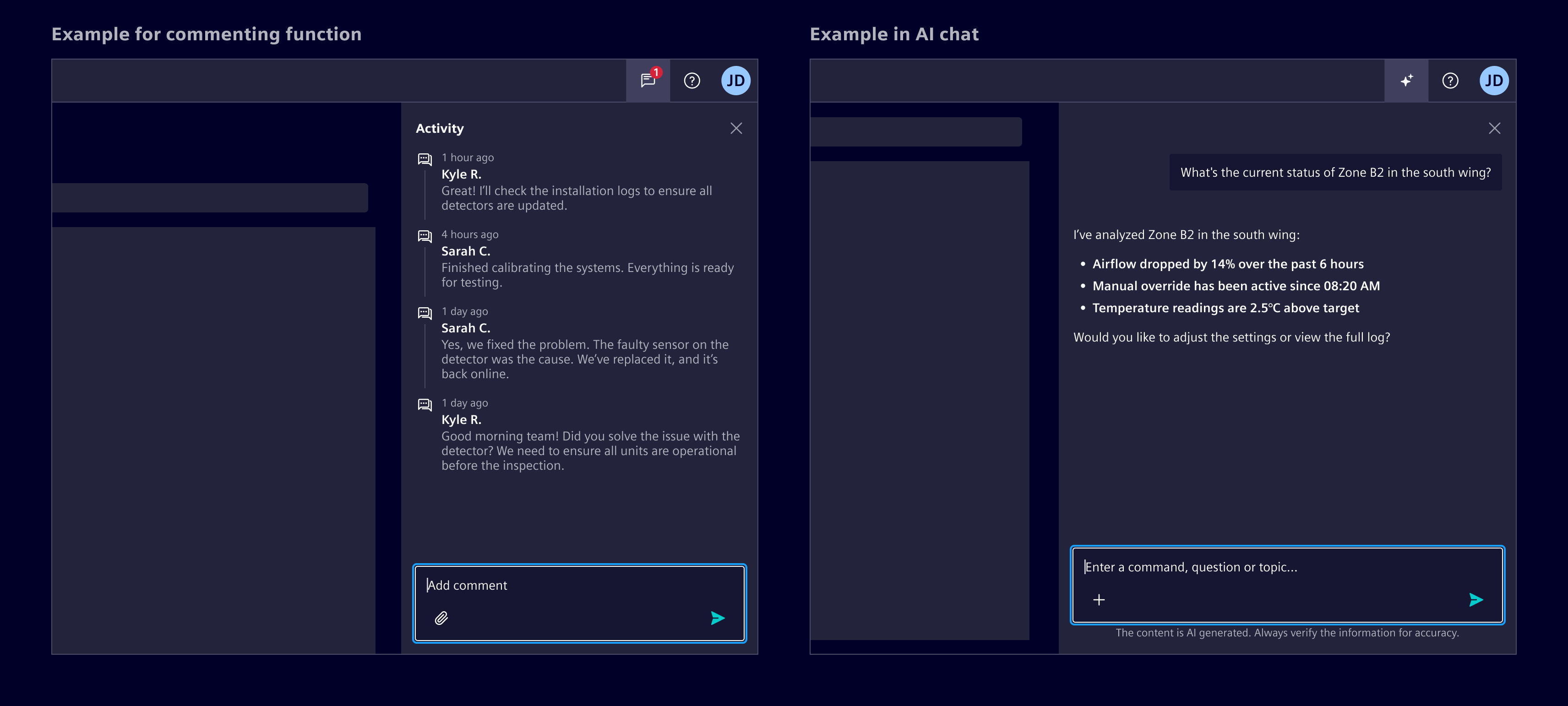
The chat input enables users to send messages or comments depending on context:
- User chat: Sends real-time messages in a conversation
- AI chat: Submits queries to a system for response
- Commenting: Adds contextual feedback or notes tied to a specific element
When to use
- In any interface where users need to communicate or leave feedback.
- When freeform text input is required in chat, messaging, or commenting scenarios.
Best practices
- Always autofocus the input prompt when the page or chat view is opened.
- Limit input width to 720px for legibility.
- Match placeholder text to context (e.g., “Ask anything”, “Type a message”, “Leave a comment”).
- Disable the send button when input is empty or invalid.
- Add the legal disclaimer when used for AI functions.
Design
Elements
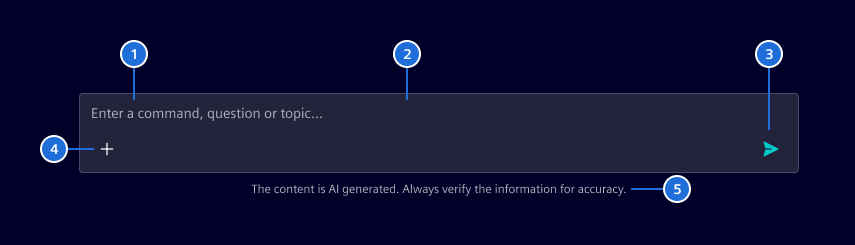
- Placeholder text, 2. Container, 3. Send button, 4. Actions (optional), 5. Legal disclaimer (only for conversational AI)
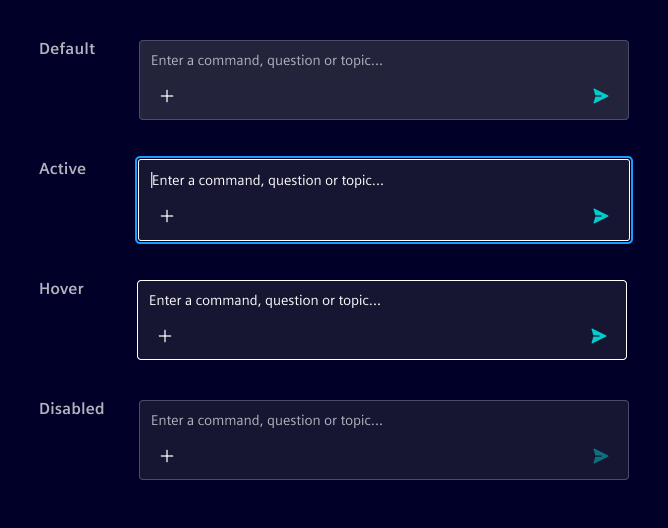
Interaction states
Actions
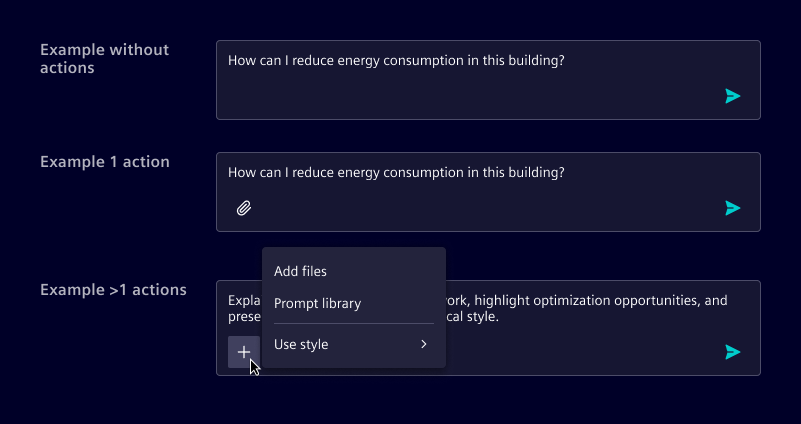
When actions are available, they appear directly below the text area It is recommended to display up to one action inline; any additional actions should be grouped into a menu.
Attachments
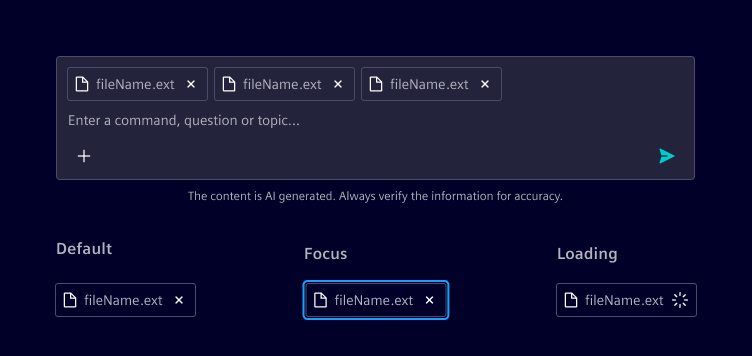
When supported, attachments appear within the input area as part of the composed message, allowing users to review and remove them before sending.
If multiple attachments are added, they wrap and stack within the input field.
Overflow behavior
The input field automatically expands as the user types, up to a set maximum height. Beyond that point, scrolling is enabled within the input.
Follow-up prompts
Follow-up prompts are suggested next actions displayed as pill buttons above the chat input after an AI response. They help users continue the conversation without having to formulate the next message from scratch.
- Prompts wrap to multiple lines when labels are long.
- Selecting a prompt inserts its text into the input field so the user can review or edit before sending.
- The prompt list is cleared when the user sends a message.
Voice input
Voice input is optional. The microphone button appears before the send button. During dictation, the text area remains visible and read-only so transcription updates do not conflict with manual edits. Attachment and other contextual actions remain available.
- Idle: The microphone starts dictation. Sending follows the usual input rules.
- Listening: Guard startup immediately, including permission requests. Cancel replaces the microphone and send is disabled. Use "Starting voice input…" during startup, then "Listening…" while awaiting speech.
- Recording: Transcription appears in real time, and confirm replaces send. The whole draft uses the secondary text color until dictation ends and normal text styling returns.
- Confirm: Dictation stops and the transcript remains editable. Confirmation never sends a message.
- Automatic completion: When the recognition provider finishes, the consumer returns to idle and keeps the transcript editable for review, without sending.
- Cancel: Dictation stops and the consumer restores the draft from before dictation.
All controls use the existing tertiary ghost buttons, icon sizing, accent color, and spacing tokens. No waveform is rendered in this version.
Focus moves to cancel while listening, then to confirm when recording begins, provided the user has stayed on the text area or dictation controls. If the user navigates to a contextual action, menu, or outside the input, automatic transitions preserve that focus. After dictation, focus returns to the text area with the cursor at the end only if it remains on the dictation controls or text area. Enter in the text area confirms during recording and never sends during dictation; Escape cancels from anywhere within the input. Repeated Enter events are ignored, so holding Enter cannot confirm and immediately send. Buttons also support their native Enter and Space activation.
Code
Follow-up prompts
Pass a string[] to followUpPrompts to display suggested prompts above the input. When the user clicks a prompt, followUpPromptSelected emits its text. Use the event to insert the text into the input and clear the prompt list. Clear the list (set to []) on send and repopulate it after each AI response.
<si-chat-input
  [followUpPrompts]="aiResponse?.followUpPrompts ?? []"
  (followUpPromptSelected)="onFollowUpSelected($event)"
  (send)="onSend($event)"
/>
Voice input
Enable the controls with voiceInput and drive voiceInputState from your speech recognition integration. Element does not access the microphone or depend on a speech-to-text library. The example simulates asynchronous startup and partial transcription updates without requesting microphone access. Startup is cancellable before the first transcript arrives. After the final simulated result, dictation finishes automatically and the transcript remains editable for review. Users can also confirm earlier to stop dictation and keep the partial transcript. Switch off Automatic completion below the example to require user confirmation after the final result. The switch is disabled during dictation so the completion mode stays fixed for each attempt.
<si-chat-input
  [voiceInput]="true"
  [voiceInputState]="voiceInputState()"
  [(value)]="draft"
  (voiceInputStart)="startDictation()"
  (voiceInputConfirm)="confirmDictation()"
  (voiceInputCancel)="cancelDictation()"
  (send)="sendMessage($event)"
/>
The consumer owns the recognition lifecycle, state, and transcript:
- On
voiceInputStart, reject concurrent starts, save the current draft, and set the state tolisteningsynchronously, before awaiting microphone permission or provider startup. This locks editing and sending while keeping cancellation available. UselisteningLabelto announce "Starting voice input…" during startup and "Listening…" once the provider is ready. Associate asynchronous startup and transcript callbacks with the current attempt. - When speech is detected, set the state to
recording. Updatevaluewith each complete draft, including any existing text. Partial results can replace previous partial results; do not append the same interim words repeatedly. The text area resizes for external updates. - On
voiceInputConfirm, stop recognition, apply any final result, then set the state toidle. The user can review, edit, dictate more, or send the message. - On
voiceInputCancel, stop recognition, restore the saved draft, then set the state toidle. Attachments are not cleared by dictation controls. - When the provider ends the recognition session naturally, apply any final result, release recognition resources, and set the state to
idle, keeping the transcript for review. Do not send the message automatically. This transition does not require avoiceInputConfirmevent.
Silence detection and automatic stopping belong to the speech recognition integration, not the chat input. Providers may expose voice activity, end-of-utterance, silence timeout, or session-ended events. A speech pause or end of an utterance does not necessarily end a continuous recognition session. Follow the provider's lifecycle and your application's stopping policy, and keep dictation active until final results have been collected and recognition has finished.
The events are requests: they do not change voiceInputState or value automatically. Keep the active state until asynchronous finalization completes. Cancellation, completion, and destruction must invalidate the current attempt. Ignore both successful and failed callbacks from invalidated attempts: they must not update state or restore an old draft over edits made after cancellation or during a later attempt. Release any resources returned by a late startup result, and release microphone resources when the view is destroyed.
On permission denial or recognition failure for the current attempt, stop recognition, restore the draft protected by the startup lock, return to idle, and present an appropriate accessible error message or notification. Do not defer the startup lock until permission is granted or unconditionally restore a saved draft from a stale error handler. Only enable voice input when your integration supports it. The microphone control is disabled during response generation.
Customize startDictationLabel, cancelDictationLabel, confirmDictationLabel, and listeningLabel with translatable strings. The listening status is announced without announcing every partial transcript. Consumers can hide irrelevant custom actions during dictation if needed. Waveform rendering and audio-level inputs are intentionally deferred; no audio data is required by the current interface.
SiChatInputComponent API Documentation
si-chat-inputChat input component for composing and sending messages in conversational interfaces.
The chat input component provides a text area for users to compose messages, supporting text, attachments, and contextual actions. It appears as a textarea with buttons for adding attachments and sending messages, as well as an optional disclaimer.
The component automatically handles: - Styling for chat input and actions. - Dynamic resizing of the textarea based on content. - Uploading of and displaying of attachments above the input area. - Displaying primary and secondary actions.
Additionally to the inputs and outputs documented here, the component supports content projection via the following slots: - Default content: Custom action buttons to display inline, prefer using the actions input for buttons, can be used in addition. - siChatInputDisclaimer selector: Custom disclaimer content to display below the input area, prefer using the disclaimer input for simple text disclaimers.
See - SiAttachmentListComponent for the base attachment component - SiChatInputDisclaimerDirective to slot in custom disclaimer content
Input Properties
| Name | Type | Default | Description |
|---|---|---|---|
| accept ¶ | string | undefined | Accepted file types for attachments (as accept string) |
| actionParam ¶ | any | Parameter to pass to action handlers | |
| actions ¶ | MessageAction[] | [] | Primary actions available in the input. Provide at most one action. |
| allowAttachments ¶ | boolean | false | Whether file attachments are supported |
| attachFileLabel ¶ | TranslatableString | $localize`:@@SI_CHAT_INPUT.ATTACH_FILE:Attach file` | Attach file button aria label |
| attachments ¶ | ChatInputAttachment[] | [] | Current attachments |
| autoFocus ¶ | boolean | false | Auto-focus the input on component initialization |
| cancelDictationLabel ¶ | TranslatableString | $localize`:@@SI_CHAT_INPUT.CANCEL_DICTATION:Cancel dictation` | Cancel dictation button label. |
| confirmDictationLabel ¶ | TranslatableString | $localize`:@@SI_CHAT_INPUT.CONFIRM_DICTATION:Confirm dictation` | Confirm dictation button label. |
| disabled ¶ | boolean | false | Whether the input is disabled |
| disclaimer ¶ | TranslatableString | A disclaimer to display. If not provided, the component will look for projected content with the siChatInputDisclaimer directive. If both are empty, no disclaimer section will be shown (handled via CSS :empty). | |
| followUpPrompts ¶ | string[] | [] | Suggested follow-up prompts to display as pill buttons above the chat input. Use followUpPromptSelected to handle selection and update the input value. Typically populated from AI response data and cleared after selection or on send. |
| interruptButtonLabel ¶ | TranslatableString | $localize`:@@SI_CHAT_INPUT.INTERRUPT:Stop processing` | Interrupt button label |
| interruptible ¶ | boolean | false | Whether the input supports interrupting ongoing operations. When active, the send button transforms into an interrupt button (with element-stop-filled icon). If sending is true, the interrupt button will be disabled. |
| label ¶ | string | t(() => $localize`:@@SI_CHAT_INPUT.LABEL:Chat input`) | The label for the input, used for accessibility |
| listeningLabel ¶ | TranslatableString | $localize`:@@SI_CHAT_INPUT.LISTENING:Listening…` | Placeholder while waiting for speech. |
| maxFileSize ¶ | number | 10485760 (10MB) | Maximum file size in bytes |
| maxLength ¶ | number | Maximum number of characters allowed | |
| placeholder ¶ | TranslatableString | $localize`:@@SI_CHAT_INPUT.PLACEHOLDER:Enter a message…` | Placeholder text for the input |
| removeAttachmentLabel ¶ | TranslatableString | $localize`:@@SI_ATTACHMENT_LIST.REMOVE_ATTACHMENT:Remove {{attachment}}` | Remove attachment aria label. The attachment name is available with {{attachment}} . |
| secondaryActions ¶ | MenuItem[] | [] | Secondary actions available in dropdown menu |
| secondaryActionsLabel ¶ | TranslatableString | $localize`:@@SI_CHAT_INPUT.SECONDARY_ACTIONS:Additional actions` | More actions button aria label |
| sendButtonIcon ¶ | string | this.icons.elementSendFilled | Send button icon |
| sendButtonLabel ¶ | TranslatableString | $localize`:@@SI_CHAT_INPUT.SEND:Send` | Send button label |
| sending ¶ | boolean | false | Whether a message is currently being sent, also prevent the sending of new ones while still allowing the user to type |
| startDictationLabel ¶ | TranslatableString | $localize`:@@SI_CHAT_INPUT.START_DICTATION:Start dictation` | Start dictation button label. |
| value ¶ | string | '' | Current input value |
| voiceInput ¶ | boolean | false | Whether voice input controls are available. Speech recognition is managed by the consumer. |
| voiceInputState ¶ | ("idle" | "recording" | "listening") | 'idle' | Consumer-controlled voice input state. Use listening during startup and while awaiting speech, and recording when transcription starts. Stream transcript updates through value . |
Output Properties
| Name | Type | Description |
|---|---|---|
| attachmentsChange ¶ | ChatInputAttachment[] | Current attachments |
| fileError ¶ | FileUploadError | Emitted when file upload errors occur |
| followUpPromptSelected ¶ | string | Emitted when the user selects a follow-up prompt. The emitted value is the text of the selected prompt. |
| interrupt ¶ | void | Emitted when the user wants to interrupt the current operation |
| send ¶ | { attachments: ChatInputAttachment[], content: string } | Emitted when the user wants to send a message |
| valueChange ¶ | string | Current input value |
| voiceInputCancel ¶ | void | Requests that the consumer stop recognition and restore the draft from before dictation. |
| voiceInputConfirm ¶ | void | Requests that the consumer stop recognition and keep the transcript for review, without sending. |
| voiceInputStart ¶ | void | Requests that the consumer start speech recognition. Does not change the state or value. |
Attributes and Methods
| Name | Type | Default | Description |
|---|---|---|---|
| focus() ¶ | () => void | Focus the textarea input |
Types Documentation
| Actions for messages representing an action with icon, label (for accessibility), and handler, for use within SiAiMessageComponent and SiUserMessageComponent . Only the icon will be displayed. See - SiAiMessageComponent for the AI message - SiUserMessageComponent for thee user message | |||||
|---|---|---|---|---|---|
|
| Represents a translatable string. This can either be a translation key, e.g. ACTIONS.EDIT that will be automatically translated when displayed on the UI or a pre-translated string, e.g. Edit . Equivalent to a normal string in usage and functionality. |
|---|
| Attachment item interface for file attachments in chat messages, extension of Attachment for SiAttachmentListComponent to use within SiChatInputComponent . Adds the action file information. Can be used within SiChatContainerComponent . See - Attachment for base attachment interface - SiAttachmentListComponent for the attachment list component - SiChatInputComponent for the chat input component - SiChatContainerComponent for the chat container component | ||||||
|---|---|---|---|---|---|---|
|
|
| Attachment item interface for file attachments in chat messages, used by SiAttachmentListComponent and inside SiUserMessageComponent as well as SiChatInputComponent . See - SiAttachmentListComponent for the attachment list component - SiUserMessageComponent for the user message - SiChatInputComponent for the chat input component | |||
|---|---|---|---|
|
|
|
| Represents a menu item that navigates using the Angular Router. Requires a configured Angular Router. | |||||||||||
|---|---|---|---|---|---|---|---|---|---|---|---|
|
|
|
|
|
|
|
|
|
| Definition of a single source | |||||
|---|---|---|---|---|---|
|
import imported from @types/node |
|---|
| Implement and provide this to an SiMenuFactoryComponent to receive trigger events. | |||||||
|---|---|---|---|---|---|---|---|
| |||||||
|
| Reference to a modal dialog | ||||||||||||
|---|---|---|---|---|---|---|---|---|---|---|---|---|
| ||||||||||||
| ||||||||||||
| ||||||||||||
|
Property Optional source description. |
|---|
|
|
| Used in events emitted from SiLinkActionService | |||
|---|---|---|---|
|
|
| Attachment list component for displaying file attachments in chat messages. This component renders a list of file attachments with icons, names, and optional preview and remove functionality. It's designed to work with chat message components to show files that have been uploaded or shared in conversations. This component provides: - A list of pills showing each attachment's name and an icon - Optional preview modal for attachments - Optional remove functionality for editable messages The component is included within SiUserMessageComponent , SiAiMessageComponent and SiChatInputComponent but can also be used inside custom chat messages with SiChatMessageComponent See - SiUserMessageComponent for user message display - SiAiMessageComponent for AI message display - SiChatMessageComponent for custom chat message display - SiChatInputComponent for chat input with attachment support - Attachment for attachment data structure | |||||||||||||||||
|---|---|---|---|---|---|---|---|---|---|---|---|---|---|---|---|---|---|
| |||||||||||||||||
| |||||||||||||||||
|
| Directive to mark content as chat input disclaimer into SiChatInputComponent . Apply this directive to content that should be slotted into the disclaimer area. Example: See SiChatInputComponent for the chat input wrapper component | ||
|---|---|---|
|
| User message component for displaying the user's messages in conversational interfaces. The user message component renders user-submitted content in (AI) chat interfaces, supporting text, attachments, and contextual actions. It appears as a text bubble aligned to the right side. Can be used within SiChatContainerComponent . The component automatically handles: - Styling for user messages distinct from AI or generic chat messages - Displaying attachments above the message bubble - Displaying primary and secondary actions See - SiChatMessageComponent for the base message wrapper component - SiAiMessageComponent for the AI message component - SiAttachmentListComponent for the base attachment component - SiChatContainerComponent for the chat container to use this within | |||||||||
|---|---|---|---|---|---|---|---|---|---|
| |||||||||
|
| AI message component for displaying AI-generated responses in conversational interfaces. The AI message component renders AI-generated content in chat interfaces, supporting text, loading states, and contextual actions. It appears as text (no bubble) aligned to the left side without any avatar/icon slot. Can be used within SiChatContainerComponent . The component automatically handles: - Styling for AI messages distinct from user or generic chat messages - Showing loading states with skeleton UI during generation - Displaying primary and secondary actions See - SiChatMessageComponent for the base message wrapper component - SiUserMessageComponent for the user message component - SiChatContainerComponent for the chat container to use this within | ||||||||||
|---|---|---|---|---|---|---|---|---|---|---|
| ||||||||||
|
| Base declarative chat message component that provides the layout structure for chat messages. This component handles the core message layout including avatar positioning, loading states, and action button as well as attachment list placement. It serves as the foundation for more specialized message components like SiUserMessageComponent and SiAiMessageComponent . Can be used within SiChatContainerComponent . The component provides: - Flexible alignment (start/end) for different message types - Avatar/icon slot for message attribution - Loading state with skeleton UI - Action buttons positioned on the side or bottom - Attachment list display slot - Responsive behavior that adapts to container size This is a low-level component designed for slotting in custom content, it provides slots via content projection: - Default content: Main message content area (consider using si-markdown for markdown support) - si-avatar/si-icon/img selector: Avatar or icon representing the message sender - si-chat-message-action selector: Action buttons related to the message - si-attachment-list selector: Attachment list component for displaying file attachmentsSee - SiUserMessageComponent for user message display - SiAiMessageComponent for AI message display - SiAttachmentListComponent for attachment list to slot in - SiChatMessageActionDirective for action buttons to slot in - SiChatContainerComponent for the chat container to use this within | ||||
|---|---|---|---|---|
| ||||
|
| A declarative container component for displaying a chat interface with automatic scroll-to-bottom behavior. This component provides the layout and styling for a chat interface, managing scrolling behavior to keep the newest messages visible while respecting user scrolling actions. It automatically scrolls to the bottom when new content is added, unless the user has scrolled up to view older messages. Use via content projection: - Default content: Chat messages displayed in the scrollable messages container or a welcome screen (empty state). - si-inline-notification selector: Notification component displayed above the input area - si-chat-input or [siChatContainerInput] selector: Input controls for composing messagesSee - SiChatInputComponent for the chat input wrapper component - SiChatContainerInputDirective for other input controls to slot in - SiAiMessageComponent for AI messages to slot in - SiUserMessageComponent for user messages (in AI chats) to slot in - SiChatMessageComponent for the chat message wrapper component to slot in other messages | ||||||||||||
|---|---|---|---|---|---|---|---|---|---|---|---|---|
| ||||||||||||
| ||||||||||||
|
| |||||||||||||||||||||||||
| |||||||||||||||||||||||||
|
| Directive to mark content as chat message actions into SiChatMessageComponent . Apply this directive to e.g. buttons that should be slotted into the message actions area. Example: See SiChatMessageComponent for the chat message wrapper component | ||
|---|---|---|
|
| A directive to mark elements as input controls within a SiChatContainerComponent . This directive is used to identify and style input elements that belong to the chat container component, typically applied to form inputs or textareas used for composing chat messages. Example: See SiChatContainerComponent for the chat container wrapper component | ||
|---|---|---|
|
| Directive for handling file uploads with validation for file type and size. Example: | |||||||||||||||||||||||||||||||||||||||||||||
|---|---|---|---|---|---|---|---|---|---|---|---|---|---|---|---|---|---|---|---|---|---|---|---|---|---|---|---|---|---|---|---|---|---|---|---|---|---|---|---|---|---|---|---|---|---|
| |||||||||||||||||||||||||||||||||||||||||||||
| |||||||||||||||||||||||||||||||||||||||||||||
|
| |||||||||||||||||||||||||||
| |||||||||||||||||||||||||||
|
| |||||||
| |||||||
|
Except where otherwise noted, content on this site is licensed under MIT License.