Chat message
The chat message represents an individual message in a conversational interface.
Usage
The chat message displays conversational content exchanged between participants. It helps users follow the dialogue and distinguish who sent each message.
There are two variants:
- User message: represents the message sent by the user
- AI message: represents the automated or system-generated response
User message
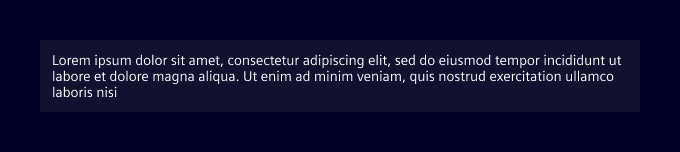
Displayed as a text bubble, the user message visually represents the user’s contribution to a conversation. It may support contextual actions such as copy, edit, or delete.
Use it in chat interfaces where user input is shown as part of a dialogue, or in conversation histories and transcripts.
AI message
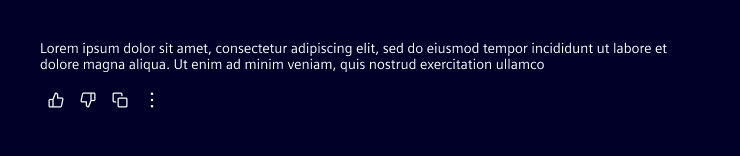
The AI message visually distinguishes automated responses from user input. It can include optional actions or related content relevant to the user.
Use it to display AI-generated content in chat interfaces, or to provide system-driven assistance, explanations, or follow-up actions.
Source citations
AI messages can optionally surface the sources that informed a response. Two chips are available for this purpose:
- Inline source chip: appears at the end of the message body, embedded in the text flow. Shows the title of the first cited source, with a
+Nsuffix when multiple sources are present. - Summary source chip: appears in the actions row below the message. Shows a globe icon and a "Sources" label. Place it there using the
siAiMessageActiondirective.
Both chips open a popover that lists all cited sources with their title, excerpt, and a link.
Best practices
- Allow user interaction (feedback, retry, copy) when appropriate.
- Always place the AI message directly in the background. Do not wrap it in an additional container.
- Constrain the AI message to a maximum width of 720px for readability.
Design
User message
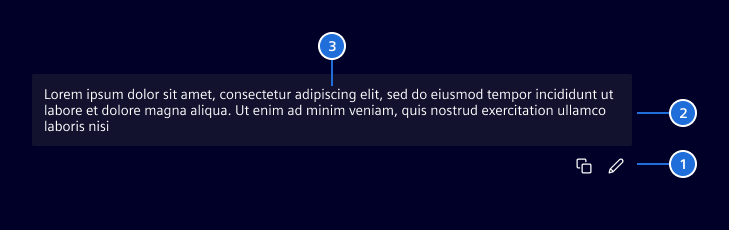
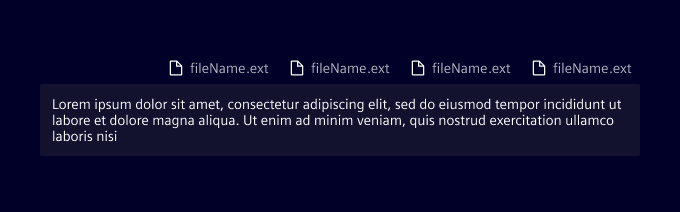
- Actions (optional), 2. Message bubble, 3. User message
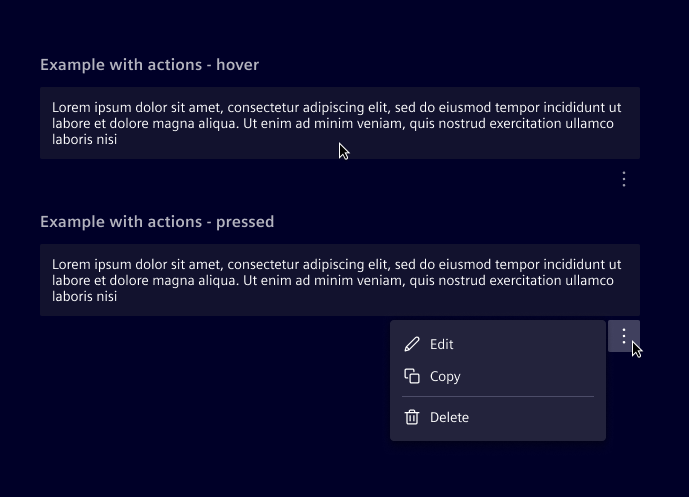
Actions are revealed on hover for desktop users, and on tap for mobile users where hover interactions aren’t supported.
When attachments are included in a user message, they should appear above the message bubble. Attachments are arranged horizontally and wrap to the next line when they exceed the available space.
For general attachment errors (e.g., file not supported), display an inline error message above the field, following the AI pattern guidelines.
AI message
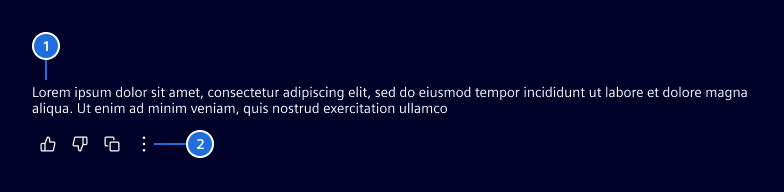
- AI icon, 2. AI message, 3. Actions (optional)
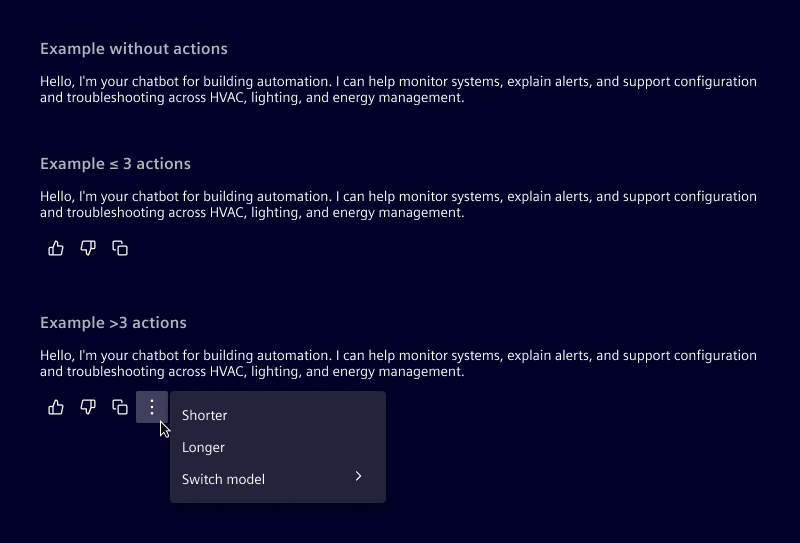
When actions are present, they’re always positioned below the text area. Is possible to display up to 4 actions inline; any additional actions will be collapsed into a menu.
Source chip
The inline source chip sits at the end of the last paragraph of the AI message body. It renders as a compact pill with an optional icon and the first source's title. When more than one source is cited, a +N count is appended.
The summary source chip is placed in the actions row alongside other action buttons. It uses a globe icon and a translatable "Sources" label.
Both chips open a popover on click that lists each source with its title, a short excerpt, and a link that opens in a new tab. Only one chip type should be shown at a time: use the inline chip while the response is being streamed, and switch to the summary chip once streaming is complete.
Responsive behavior
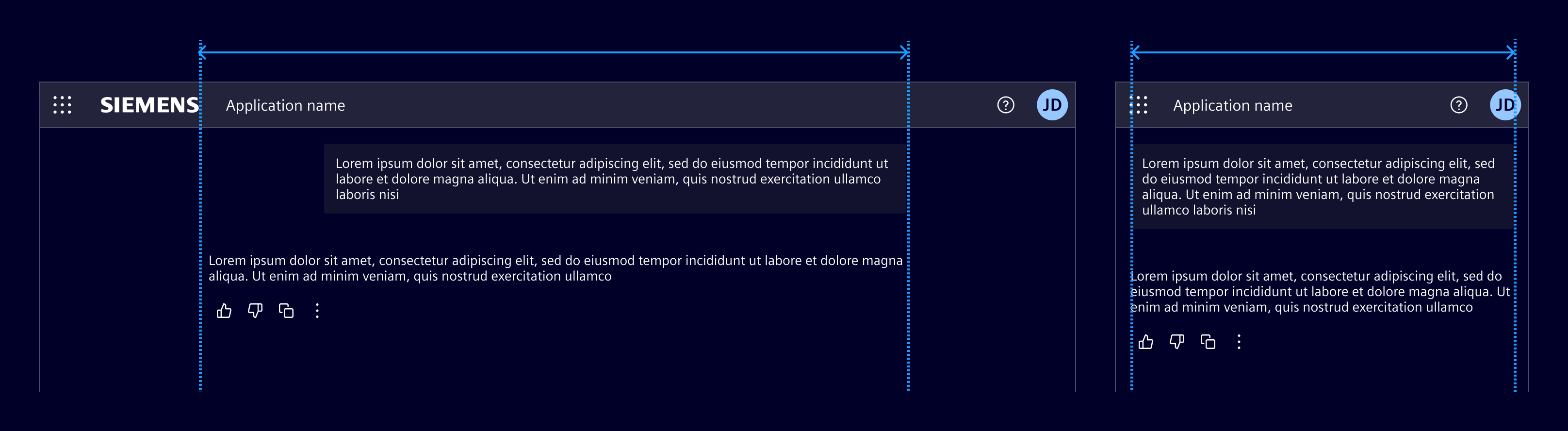
For all breakpoints, the layout remains the same. The text reflows to fit the available space while preserving hierarchy and alignment.
Code
SiUserMessageComponent API Documentation
si-user-messageUser message component for displaying the user's messages in conversational interfaces.
The user message component renders user-submitted content in (AI) chat interfaces, supporting text, attachments, and contextual actions. It appears as a text bubble aligned to the right side and supports markdown formatting for rich content. Can be used within SiChatContainerComponent .
The component automatically handles: - Styling for user messages distinct from AI or generic chat messages - Option to render markdown content, provide via contentFormatter input with a markdown renderer function (e.g., from getMarkdownRenderer ) - Displaying attachments above the message bubble - Displaying primary and secondary actions
See - SiChatMessageComponent for the base message wrapper component - SiAiMessageComponent for the AI message component - SiAttachmentListComponent for the base attachment component - getMarkdownRenderer for markdown formatting support - SiChatContainerComponent for the chat container to use this within
Input Properties
| Name | Type | Default | Description |
|---|---|---|---|
| actionParam ¶ | any | Parameter to pass to action handlers | |
| actions ¶ | MessageAction[] | [] | Primary message actions (edit, delete, copy, etc.). All actions displayed inline |
| attachments ¶ | Attachment[] | [] | List of attachments included with this message |
| content ¶ | string | '' | The user message content |
| contentFormatter ¶ | (text: string) => (string | Node) | undefined | Optional formatter function to transform content before display. - Returns string: Content will be inserted as text with built-in sanitization - Returns Node: DOM node will be inserted directly without sanitization Note: When returning a Node with formatted content, apply the markdown-content class to the root element to ensure proper styling (e.g., div.className = 'markdown-content' ). The function returned by getMarkdownRenderer does this automatically.Warning: When returning a Node, ensure the content is safe to prevent XSS attacks |
| secondaryActions ¶ | MenuItem[] | [] | Secondary actions available in dropdown menu, first use primary actions and only add secondary actions additionally |
| secondaryActionsLabel ¶ | TranslatableString | $localize`:@@SI_USER_MESSAGE.SECONDARY_ACTIONS:More actions` | More actions button aria label |
SiAiMessageComponent API Documentation
si-ai-messageAI message component for displaying AI-generated responses in conversational interfaces.
The AI message component renders AI-generated content in chat interfaces, supporting text formatting, markdown, loading states, and contextual actions. It appears as text (no bubble) aligned to the left side without any avatar/icon slot. Can be used within SiChatContainerComponent .
The component automatically handles: - Styling for AI messages distinct from user or generic chat messages - Option to render markdown content, provide via contentFormatter input with a markdown renderer function (e.g., from getMarkdownRenderer ) - Showing loading states with skeleton UI during generation - Displaying primary and secondary actions
See - SiChatMessageComponent for the base message wrapper component - SiUserMessageComponent for the user message component - getMarkdownRenderer for markdown formatting support - SiChatContainerComponent for the chat container to use this within
Input Properties
| Name | Type | Default | Description |
|---|---|---|---|
| actionParam ¶ | unknown | Parameter to pass to action handlers | |
| actions ¶ | MessageAction[] | [] | Primary actions available for this message (thumbs up/down, copy, retry, etc.) All actions displayed inline |
| content ¶ | string | '' | The AI-generated message content |
| contentFormatter ¶ | (text: string) => (string | Node) | undefined | Optional formatter function to transform content before display. - Returns string: Content will be sanitized using Angular's DomSanitizer - Returns Node: DOM node will be inserted directly without sanitization Note: If using a markdown renderer, make sure to apply the markdown-content class to the root element to ensure proper styling using the Element theme (e.g., div.className = 'markdown-content' ). The function returned by getMarkdownRenderer does this automatically.Warning: When returning a Node, ensure the content is safe to prevent XSS attacks |
| loading ¶ | boolean | false | Whether the message is currently being generated (shows skeleton) |
| secondaryActions ¶ | MenuItem[] | [] | Secondary actions available in dropdown menu, first use primary actions and only add secondary actions additionally |
| secondaryActionsLabel ¶ | TranslatableString | $localize`:@@SI_AI_MESSAGE.SECONDARY_ACTIONS:More actions` | More actions button aria label |
| sources ¶ | SiAiSource[] | [] | Cited sources to display as an inline chip at the end of the message body. When non-empty a SiSourceChipInlineComponent is rendered inside the message. |
Output Properties
| Name | Type | Description |
|---|---|---|
| chipClicked ¶ | void | Emitted when the inline sources chip is clicked. |
Base chat message
Use these base components to build custom chat message interfaces.
The si-chat-message component is a wrapper component, it has slots for different parts of a chat message.
The slots are:
si-attachment-list/si-badge- For displaying attachments related to the message.si-avatar/si-icon/img- For the avatar or icon representing the message sender.siChatMessageAction (helper directive)- For actions related to the message.
SiChatMessageComponent API Documentation
si-chat-messageBase declarative chat message component that provides the layout structure for chat messages.
This component handles the core message layout including avatar positioning, loading states, and action button as well as attachment list placement. It serves as the foundation for more specialized message components like SiUserMessageComponent and SiAiMessageComponent . Can be used within SiChatContainerComponent .
The component provides: - Flexible alignment (start/end) for different message types - Avatar/icon slot for message attribution - Loading state with skeleton UI - Action buttons positioned on the side or bottom - Attachment list display slot - Responsive behavior that adapts to container size
This is a low-level component designed for slotting in custom content, it provides slots via content projection: - Default content: Main message content area (consider using SiMarkdownRendererComponent for markdown support) - si-avatar/si-icon/img selector: Avatar or icon representing the message sender - si-chat-message-action selector: Action buttons related to the message - si-attachment-list selector: Attachment list component for displaying file attachments
See - SiUserMessageComponent for user message display - SiAiMessageComponent for AI message display - SiAttachmentListComponent for attachment list to slot in - SiChatMessageActionDirective for action buttons to slot in - SiMarkdownRendererComponent for markdown content rendering - SiChatContainerComponent for the chat container to use this within
Input Properties
| Name | Type | Default | Description |
|---|---|---|---|
| actionsPosition ¶ | ("bottom" | "side") | 'side' | Where to display action buttons (if any) |
| alignment ¶ | ("end" | "start") | 'start' | Alignment of the message |
| loading ¶ | boolean | false | Whether the message is currently loading |
Attachment list
SiAttachmentListComponent API Documentation
si-attachment-listAttachment list component for displaying file attachments in chat messages.
This component renders a list of file attachments with icons, names, and optional preview and remove functionality. It's designed to work with chat message components to show files that have been uploaded or shared in conversations.
This component provides: - A list of pills showing each attachment's name and an icon - Optional preview modal for attachments - Optional remove functionality for editable messages
The component is included within SiUserMessageComponent , SiAiMessageComponent and SiChatInputComponent but can also be used inside custom chat messages with SiChatMessageComponent
See - SiUserMessageComponent for user message display - SiAiMessageComponent for AI message display - SiChatMessageComponent for custom chat message display - SiChatInputComponent for chat input with attachment support - Attachment for attachment data structure
Input Properties
| Name | Type | Default | Description |
|---|---|---|---|
| alignment ¶ | ("end" | "start") | 'start' | Whether to align attachments to the end (right) or start (left) |
| attachments ¶ | Attachment[] | [] | List of attachments to display |
| removable ¶ | boolean | false | Whether to show remove buttons on attachments |
| removeLabel ¶ | TranslatableString | $localize`:@@SI_ATTACHMENT_LIST.REMOVE_ATTACHMENT:Remove {{attachment}}` | Label for remove attachment button. The attachment name is available with {{attachment}} . |
Output Properties
| Name | Type | Description |
|---|---|---|
| remove ¶ | Attachment | Emitted when an attachment should be removed |
Source chips
Note: The source chip components are currently experimental and may undergo changes in future releases.
Pass the sources input directly to si-ai-message to render the inline chip automatically. To show the summary chip in the actions row, project it with the siAiMessageAction directive.
SiSourceChipInlineComponent API Documentation
si-source-chip-inlineInline source chip for AI messages.
Renders a compact pill that appears inline with the AI message text, aligned to the paragraph line height (20 px). Opens a popover listing the cited sources when clicked.
Input Properties
| Name | Type | Default | Description |
|---|---|---|---|
| active ¶ | boolean | false | Whether the chip is in active (focused/selected) state. |
| icon ¶ | string | Optional icon shown before the label. | |
sources ¶ ¶ | SiAiSource[] | The sources cited inline. The first source's title becomes the chip label. |
Output Properties
| Name | Type | Description |
|---|---|---|
| chipClicked ¶ | void | Emitted when the chip is clicked or activated via keyboard. |
SiSourceChipSummaryComponent API Documentation
si-source-chip-summarySummary source chip for AI messages.
Renders a single "Sources" pill with a globe icon at the end of an AI message, alongside the action buttons. Opens a popover listing all cited sources when clicked.
@remarks: Use together with the siAiMessageAction directive to place the chip in the actions row of an <si-ai-message> :
<si-source-chip-summary siAiMessageAction [sources]="mySources" />
Input Properties
| Name | Type | Default | Description |
|---|---|---|---|
| active ¶ | boolean | false | Whether the chip is in active (focused/selected) state. |
| label ¶ | TranslatableString | $localize`:@@SI_AI_SOURCE_CHIP.SOURCES:Sources` | The label shown on the chip. |
| sources¶ | SiAiSource[] | The sources to list in the popover. |
Output Properties
| Name | Type | Description |
|---|---|---|
| chipClicked ¶ | void | Emitted when the chip is clicked or activated via keyboard. |
SiAiMessageActionDirective API Documentation
API not found.
Markdown renderer
Note: The markdown renderer is currently experimental and may undergo changes in future releases.
SiMarkdownRendererComponent API Documentation
si-markdown-rendererComponent to display markdown text, uses the getMarkdownRenderer function internally, relies on markdown-content theme class.
Input Properties
| Name | Type | Default | Description |
|---|---|---|---|
| text ¶ | string | '' | The markdown text to transform and display |
Types Documentation
Function Returns a markdown renderer function which_ - Transforms markdown text into formatted HTML. - Returns a DOM node containing the formatted content. Warning: The returned Node is inserted without additional sanitization. Input content is sanitized before processing. @param: Angular DomSanitizer instance Returns A function taking the markdown text to transform and returning a DOM div element containing the formatted HTML | ||
|---|---|---|
|
| Actions for messages representing an action with icon, label (for accessibility), and handler, for use within SiAiMessageComponent and SiUserMessageComponent . Only the icon will be displayed. See - SiAiMessageComponent for the AI message - SiUserMessageComponent for thee user message | |||||
|---|---|---|---|---|---|
|
| Attachment item interface for file attachments in chat messages, used by SiAttachmentListComponent and inside SiUserMessageComponent as well as SiChatInputComponent . See - SiAttachmentListComponent for the attachment list component - SiUserMessageComponent for the user message - SiChatInputComponent for the chat input component | |||
|---|---|---|---|
|
| Represents a translatable string. This can either be a translation key, e.g. ACTIONS.EDIT that will be automatically translated when displayed on the UI or a pre-translated string, e.g. Edit . Equivalent to a normal string in usage and functionality. |
|---|
|
|
| Represents a menu item that navigates using the Angular Router. Requires a configured Angular Router. | |||||||||||
|---|---|---|---|---|---|---|---|---|---|---|---|
|
|
|
|
|
|
|
import imported from @types/node |
|---|
| Represents a single cited source attached to an AI message. | ||||
|---|---|---|---|---|
|
|
| Attachment item interface for file attachments in chat messages, extension of Attachment for SiAttachmentListComponent to use within SiChatInputComponent . Adds the action file information. Can be used within SiChatContainerComponent . See - Attachment for base attachment interface - SiAttachmentListComponent for the attachment list component - SiChatInputComponent for the chat input component - SiChatContainerComponent for the chat container component | ||||||
|---|---|---|---|---|---|---|
|
|
| Implement and provide this to an SiMenuFactoryComponent to receive trigger events. | |||||||
|---|---|---|---|---|---|---|---|
| |||||||
|
|
| Reference to a modal dialog | ||||||||||||
|---|---|---|---|---|---|---|---|---|---|---|---|---|
| ||||||||||||
| ||||||||||||
| ||||||||||||
|
|
|
| Used in events emitted from SiLinkActionService | |||
|---|---|---|---|
|
|
| A declarative container component for displaying a chat interface with automatic scroll-to-bottom behavior. This component provides the layout and styling for a chat interface, managing scrolling behavior to keep the newest messages visible while respecting user scrolling actions. It automatically scrolls to the bottom when new content is added, unless the user has scrolled up to view older messages. Use via content projection: - Default content: Chat messages displayed in the scrollable messages container or a welcome screen (empty state). - si-inline-notification selector: Notification component displayed above the input area - si-chat-input or [siChatContainerInput] selector: Input controls for composing messagesSee - SiChatInputComponent for the chat input wrapper component - SiChatContainerInputDirective for other input controls to slot in - SiAiMessageComponent for AI messages to slot in - SiUserMessageComponent for user messages (in AI chats) to slot in - SiChatMessageComponent for the chat message wrapper component to slot in other messages | ||||||||||||
|---|---|---|---|---|---|---|---|---|---|---|---|---|
| ||||||||||||
| ||||||||||||
|
| Chat input component for composing and sending messages in conversational interfaces. The chat input component provides a text area for users to compose messages, supporting text, attachments, and contextual actions. It appears as a textarea with buttons for adding attachments and sending messages, as well as an optional disclaimer. The component automatically handles: - Styling for chat input and actions. - Dynamic resizing of the textarea based on content. - Uploading of and displaying of attachments above the input area. - Displaying primary and secondary actions. Additionally to the inputs and outputs documented here, the component supports content projection via the following slots: - Default content: Custom action buttons to display inline, prefer using the actions input for buttons, can be used in addition. - siChatInputDisclaimer selector: Custom disclaimer content to display below the input area, prefer using the disclaimer input for simple text disclaimers.See - SiAttachmentListComponent for the base attachment component - SiChatInputDisclaimerDirective to slot in custom disclaimer content | ||||||||||||||||||||||||||||||||||||||||||||||||||||||||
|---|---|---|---|---|---|---|---|---|---|---|---|---|---|---|---|---|---|---|---|---|---|---|---|---|---|---|---|---|---|---|---|---|---|---|---|---|---|---|---|---|---|---|---|---|---|---|---|---|---|---|---|---|---|---|---|---|
| ||||||||||||||||||||||||||||||||||||||||||||||||||||||||
| ||||||||||||||||||||||||||||||||||||||||||||||||||||||||
|
| A directive to mark elements as input controls within a SiChatContainerComponent . This directive is used to identify and style input elements that belong to the chat container component, typically applied to form inputs or textareas used for composing chat messages. Example: See SiChatContainerComponent for the chat container wrapper component | ||
|---|---|---|
|
| Directive to mark content as chat message actions into SiChatMessageComponent . Apply this directive to e.g. buttons that should be slotted into the message actions area. Example: See SiChatMessageComponent for the chat message wrapper component | ||
|---|---|---|
|
| Directive to mark content as chat input disclaimer into SiChatInputComponent . Apply this directive to content that should be slotted into the disclaimer area. Example: See SiChatInputComponent for the chat input wrapper component | ||
|---|---|---|
|
| Marker directive for projecting content into the actions row of SiAiMessageComponent . Apply this to elements that should appear alongside the standard action buttons. Example: See SiAiMessageComponent | ||
|---|---|---|
|
| |||||||||||||||||||||||||
| |||||||||||||||||||||||||
|
| Directive for handling file uploads with validation for file type and size. Example: | |||||||||||||||||||||||||||||||||||||||||||||
|---|---|---|---|---|---|---|---|---|---|---|---|---|---|---|---|---|---|---|---|---|---|---|---|---|---|---|---|---|---|---|---|---|---|---|---|---|---|---|---|---|---|---|---|---|---|
| |||||||||||||||||||||||||||||||||||||||||||||
| |||||||||||||||||||||||||||||||||||||||||||||
|
| |||||||||||||||||||||
| |||||||||||||||||||||
|
| |||||||
| |||||||
|
Except where otherwise noted, content on this site is licensed under MIT License.